
Learn how to get your Pakistani business found on Google for free. Step-by-step guide covering Google Business Profile, basic SEO, and Search Console setup.
Everyday, thousands pf Pakistanis open Google and search for bsuinesses just like yourse – dentists, restaurants, clothing stores, clinics, and repair shops.
If your business is not showing up in those search results, those custoemrs are going straight to your competitior.
The good news? Getting your business on Google is completely free and takes less than an hour to set up. In this guide, I will show you exactly how to do it – step by step – even if you have never done anything like this before.
Here is what you will learn:
- How to create and verify your Google Business Profile
- How to get your website indexed on Google
- How to start ranking in local search results in Pakistan
- The most common mistakes Pakistani businesses make on Google

Why Being on Google Matters for Pakistani Businesses
According to recent data, Pakistan has over 100 million internet users – and the majority use Google as their primary search engine. When someone in Lahore needs a dentist, when someone in Karachi wants to order food, when someone in Islamabad needs a plumber – the first thing they do is open Google search.
This mean is if your business is not on Google, you are invisible to millions of potential customers every single day.
Here is the reality for most Pakistani samll businesses:
- 90% of customers check Google before visitinga local business
- Business with Google profiles get 7x more visits than those without
- A complete Google Business Profiles gets 5x more views than an incomplete one
The best prt? You do not need to pay for Google Ads to appear on Google. With the right setup, your business can show up in local search results for free – and that is exactly what this guide will teach you.
Step 1 – Create Your Google Business Profile (It’s Free)
Google Business Profiles (previously called Google My Business) is a free tool that lets your business appear in Google Search and Google Maps when people search for businesses like yours nearby.
Here is how to set it up:
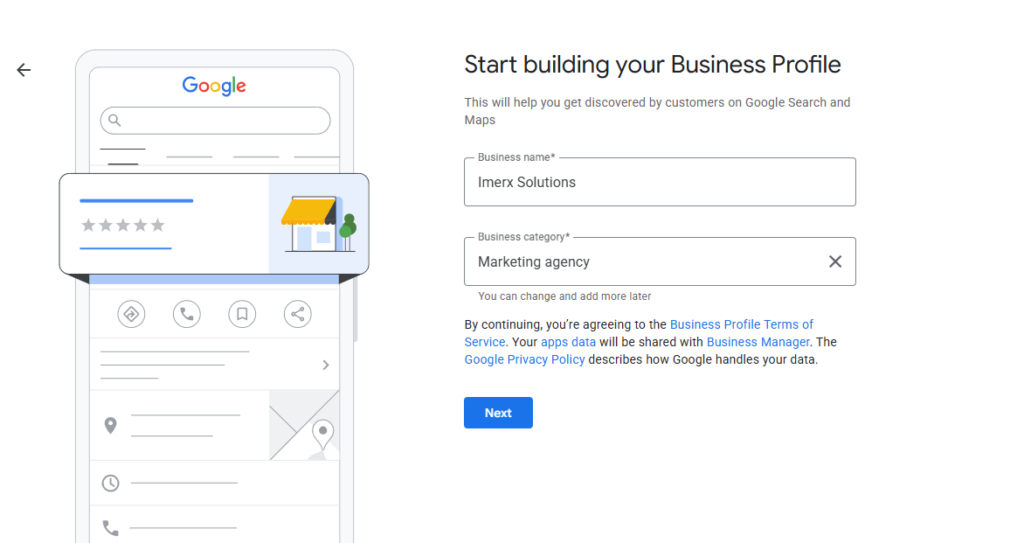
- Go to business.google.com on your computer or phone
- Click “Manage now” and sign in with your Google account
- Enter your exact buiness name – use the name customers know you by
- Chose your business category – be as specific as possible. For examle: “Dental Clinic” not jsut “Health”
- Add your location – if you have a physical shop or office, add your full address
- Add your phone number and website URL
- Set your business hours accurately
- Click Submit
Important: Make sure your business name, address, and phone number (NAP) are exactly the same everywhere online – on your website, on your Google Bussiness Profile, and on any other directory. Even small difference like “Street” vs “St” can confuse Google and hurt your location Ranking.
number (NAP) are exactly the same everywhere online — on your
website, on your Google Business Profile, and on any other
directory. Even small differences like “Street” vs “St” can
confuse Google and hurt your local ranking.
Hi, this is a comment.
To get started with moderating, editing, and deleting comments, please visit the Comments screen in the dashboard.
Commenter avatars come from Gravatar.